The weather app that reads your calendar
Never get soaked again
Rain, your meetings, and the exact window to run, ride, or walk the dog — on one timeline. You set it up once. It answers every day.
Privacy-first · your calendar never leaves the phone · no tracking
How it works
Rain is a scheduling problem. We schedule you around it.
01
You define your activities
Dog walk, bike commute, a run — how long each takes, when you’re free, which days. Ninety seconds, once.
02
We scan the weather
Hour-by-hour rain for your exact spot, 24 hours ahead, refreshed all day.
03
We tell you when to go
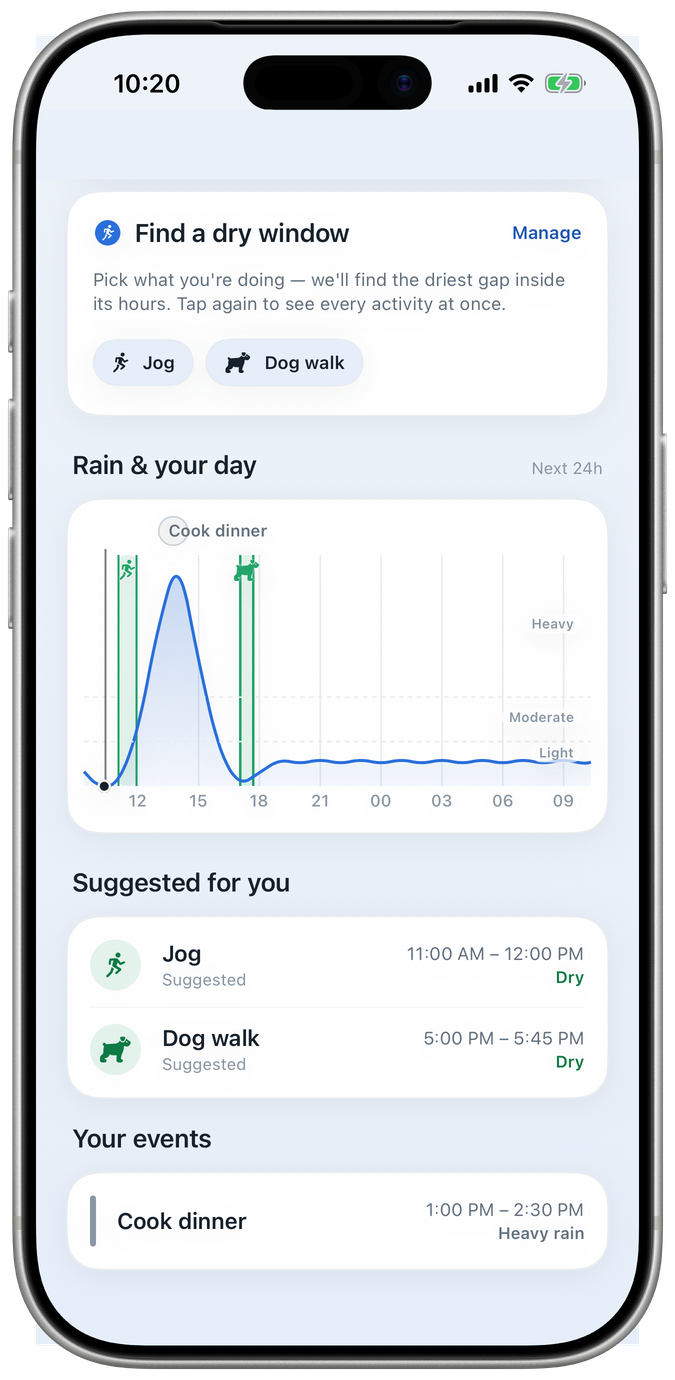
The driest window that fits — planned around your calendar, so your suggested activity windows dodge your booked meetings while ignoring all-day events.
Dog walk — best 2:15–3:00 PM
Rain returns ~3:30 PM
Features
01 · The overlay
Your calendar, with the weather on top
The blue wave is the next 24 hours of rain. The capsules are your meetings, straight from your calendar. The green band is the window that’s yours. One look, whole day — and when it rains all day, we point to the lightest stretch instead of pretending there’s a dry one.
Rain builds — your window moves.
02 · The engine
When the forecast moves, your plans move first
Your outdoor time re-plans itself around the driest windows, inside the hours you gave it. And when rain is unavoidable, you get the window with the least.
Your activities, your hours
Run, bike, walk, dog walk, garden — or your own, with custom icons, durations, time windows, and days of the week.
Scrub to read
Drag across the chart for the exact time and amount at any point — mm or inches, your call.
Rain alertsSoon
A nudge before the drops reach you, so you beat the rain instead of checking for it.
Chat interface for planningSoon
Tell the assistant what you want to do — it finds the right time for your activities.
Coming soon
Just ask. We’ll plan it.
A weather assistant you can talk to: say what you want to do, get the right time back. In development — and we’d rather say so than surprise you.
Also on the way: rain alerts that nudge you before the drops arrive.
I want to go for a picnic this weekend.
Apple Watch
Your wrist knows first
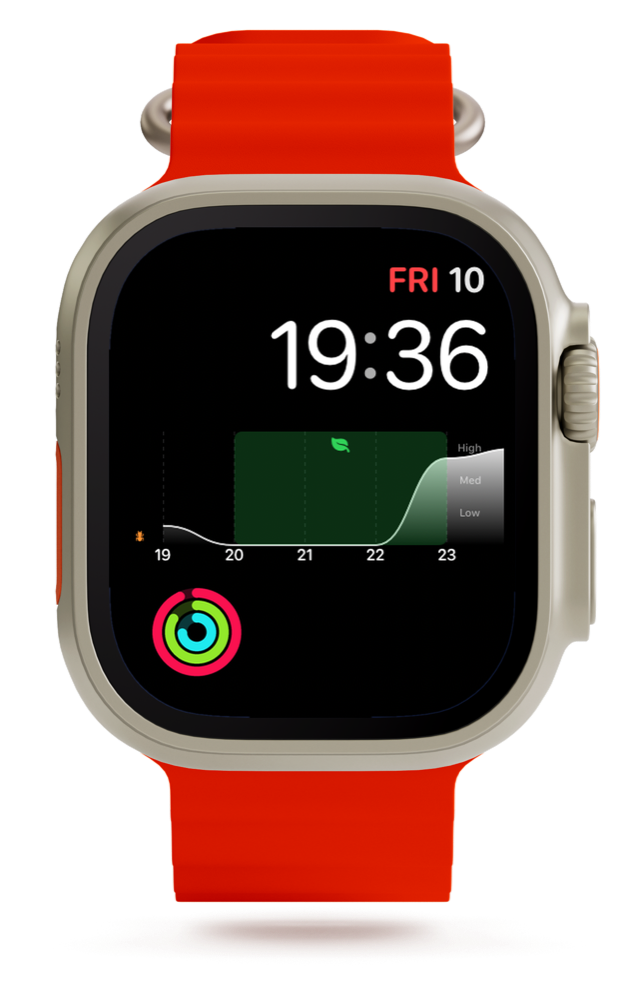
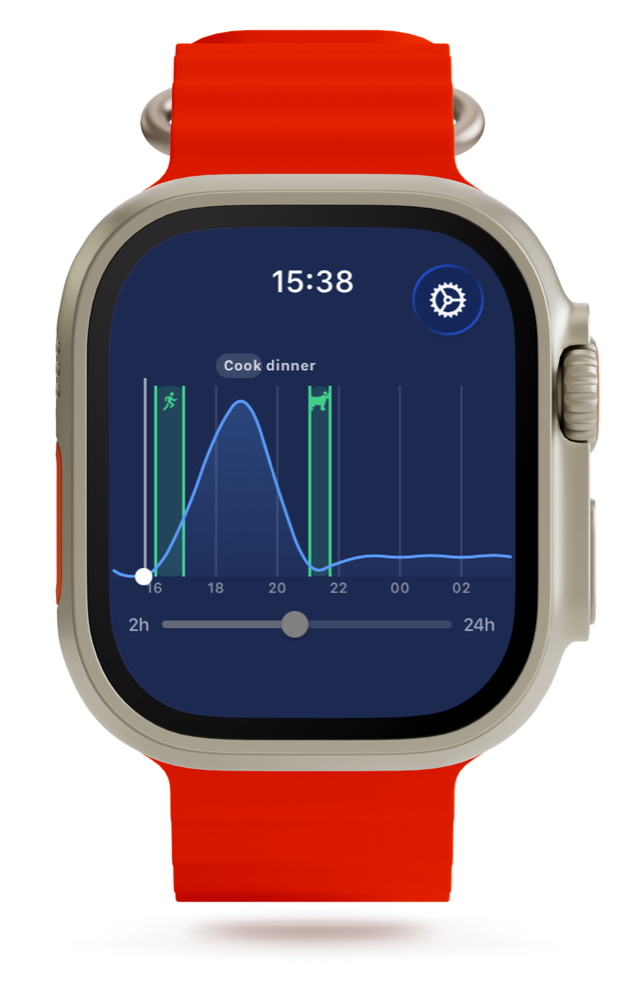
Not a temperature and an icon — the same engine as the phone, on your watch face. Three taps to set up: hold the face → Edit → add Calendar Weather.
- Rain timeline complication on your watch face
- Your calendar events, right on the chart
- Best dry window as a green band
- Crown zoom from 2 to 24 hours
- A suggested window for every activity
- Synced from your iPhone — the two always agree
Our promise
We never sell your data
Knowing the weather shouldn’t cost you your privacy. The subscription is the business model — not you. Officer Cacty is watching.
Your calendar stays on your phone
Events are read on-device with EventKit — read-only, never uploaded. There is no calendar server to breach.
Forecasts are anonymous
Rain data comes from Apple WeatherKit for the one spot you choose. No account attached, no location history kept.
Sign-in isn’t surveillance
Your account exists for exactly one thing: managing your subscription. It never sees your calendar, your location, or anything worth selling.
Pricing
One plan. Everything in it.
Calendar Weather Plus
Try 7 days free
then one simple subscription — cancel anytime
- Everything included — no tiers
- iPhone + Apple Watch
- No ads, no data selling
Weather data is licensed per request — your subscription is what keeps the forecasts accurate and the app free of ads.
FAQ
Questions, answered plainly
What is Calendar Weather?
An iPhone and Apple Watch app that lays the hourly rain forecast under your calendar and finds the driest time window for your outdoor activities — running, cycling, dog walks, garden work, and more.
How does it decide when I should go out?
You tell us what you like to do outside — how long it takes and when you’re free. We look at the next 24 hours of rain, hour by hour, find the driest stretch that fits, and mark it as a green band on your timeline. We keep it clear of your booked meetings (all-day events are fine — they cover the whole day), and we never put two of your activities in the same slot.
Does it work with my existing calendar?
Yes. It reads your iPhone calendars on-device (read-only, via Apple’s EventKit) and draws the events on the rain timeline. Nothing is written to or uploaded from your calendar.
Will it keep me 100% dry?
No — and no app can. Weather is unpredictable. We help you dodge the worst, and when it rains all day we point to the lightest window instead of pretending there’s a dry one.
Do you sell my data?
Never. Your calendar and location stay on your device, forecasts are fetched anonymously from Apple WeatherKit, and there’s no tracking. The subscription is the business model — not your data.
What does it cost?
One plan, Calendar Weather Plus, with everything included after a free trial. Accurate weather data is licensed per request, which is what the subscription pays for.
Is there an Android version?
Not today — Calendar Weather is built for iPhone and Apple Watch.
From the blog
All posts →Cacty would like to stay dry.
So would you.
7 days free, then one simple subscription. iPhone + Apple Watch.